






MasterStudy, Updates & Features
Mar 17, 2023


 Consulting
The Perfect Business WordPress Theme
Consulting
The Perfect Business WordPress Theme
 Motors
Car Dealership & Classified Listing Theme
Motors
Car Dealership & Classified Listing Theme
 Masterstudy Templates
Pack of ready-made LMS templates
Masterstudy Templates
Pack of ready-made LMS templates
 Manufacturer
Factory and Industrial WordPress Theme
Manufacturer
Factory and Industrial WordPress Theme
 MasterStudy
LMS WordPress Education Theme
MasterStudy
LMS WordPress Education Theme
 Smarty
WordPress Theme for Educational Institutions
Smarty
WordPress Theme for Educational Institutions
 Pearl
Multi-Purpose Business WordPress Theme
Pearl
Multi-Purpose Business WordPress Theme
 Splash
Sports Club WordPress Theme
Splash
Sports Club WordPress Theme
 HomePress
Real Estate WordPress Theme
HomePress
Real Estate WordPress Theme
 Companion
Corporate Business WordPress Theme
Companion
Corporate Business WordPress Theme
 beTop
Coaching & Speaker WordPress Theme
beTop
Coaching & Speaker WordPress Theme
 Hotello
Hotel Booking WordPress Theme
Hotello
Hotel Booking WordPress Theme
 Crypterio
ICO & Cryptocurrency WordPress Theme
Crypterio
ICO & Cryptocurrency WordPress Theme
 Transcargo
Transportation & Logistics WordPress Theme
Transcargo
Transportation & Logistics WordPress Theme
 HealthCoach
WP Theme for Health & Personal Coach
HealthCoach
WP Theme for Health & Personal Coach
 GlobalStudy
LMS Divi Education Child Theme
GlobalStudy
LMS Divi Education Child Theme
 Sequoia
Elementor Multipurpose WordPress Theme
Sequoia
Elementor Multipurpose WordPress Theme


Make pricing fair and transparent, motivate customers add more items or services to their order with Pricing Structure.
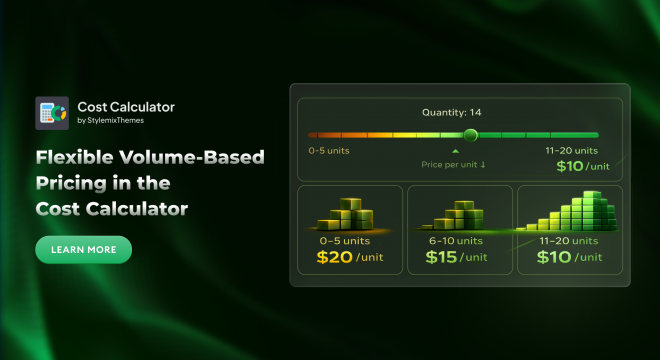

The Cost Calculator Builder has a powerful new feature – Pricing Structure. This feature is designed to give businesses more flexibility, smarter pricing strategies, and higher conversion potential without complexity.
Until now, implementing non-standard pricing logic often meant dealing with complicated formulas or custom development. With this new feature, that’s no longer necessary.
With Pricing Structure the pricing model is based on a simple and intuitive principle: the more products or services a customer orders, the greater the discount they receive. Instead of offering a flat price, the cost dynamically adjusts as quantities increase, clearly rewarding customers for larger orders.
This approach makes pricing feel fair and transparent. Besides that, customers become more motivated to add items or services to their order. As visitors see their per-unit price decrease, they are more likely to increase order size to maximize value. Thanks to this feature your sales will increase without any aggressive promotion or difficult pricing rules.
The Pricing Structure works seamlessly with the Quantity and Basic Slider elements and is available only in the Pro version of Cost Calculator, giving advanced users greater control over how pricing is calculated and presented.
To support different business scenarios, we’ve introduced several flexible pricing models:
With this model, the price per unit automatically decreases as the total order quantity increases. It’s ideal for volume discounts, clearly rewarding customers who place larger orders with better per-unit pricing.
This model calculates each quantity range separately and then combines them into a single total price. It’s perfect for structured pricing strategies where different portions of an order are priced at different rates.
With this option, the price per unit of a product or service remains fixed within a selected quantity range. This provides predictable, transparent pricing while still allowing you to define multiple ranges with different rates.
Together, these models give you the flexibility to implement powerful, quantity-based pricing strategies that are easy for customers to understand and highly effective at driving larger orders.
To better understand how these pricing models behave, let’s look at a simple example using the Basic Slider.
In this scenario, the slider is configured with a minimum value of 0 and a maximum value of 20, along with the following pricing ranges:
0–5 units: $20 per unit
6–10 units: $15 per unit
11–20 units: $10 per unit
Now, imagine a customer selects 14 units using the slider. Depending on the pricing model you choose, the final price is calculated differently:
All-Units Pricing
With this model, the lowest applicable unit price is applied to the entire quantity. Since 14 units fall into the 11-20 range, the price per unit becomes $10:
14 × $10 = $140
Tiered Pricing
Here, each pricing range is calculated separately and then combined into a total price:
5 units × $20 = $100
5 units × $15 = $75
4 units × $10 = $40
Total: $215
Flat Unit Price per Range
In this case, the selected quantity simply determines the price tier, without multiplying it by the quantity. Selecting 14 units places the customer in the 11-20 range:
Final price: $10
This example highlights how flexible pricing models can dramatically change the final cost, allowing you to choose the strategy that best matches your business goals, whether that’s maximizing volume, offering clear discounts, or keeping pricing simple and predictable.
The new Pricing Structure makes the Cost Calculator more flexible and powerful, without adding complexity. You can easily adjust prices based on order size and choose the pricing logic that best fits your business needs. Customers clearly see the value of ordering more, while businesses benefit from higher order totals and increased sales. With no complex formulas required and full control over pricing behavior, this feature helps turn your calculator into an effective sales tool. Available exclusively in the Pro version, it’s an easy way to offer smarter pricing and drive better results.