




















This is the biggest update the plugin has seen since day one. The builder, conditions, Total Summary, the whole interface. We rebuilt it. All of it. It’s ready for beta testing, and we need your hands on it before the public release.
 Important: This is a beta version. Do NOT install it on your live site. It may contain bugs, incomplete features, or breaking changes. Use a fresh test environment only: a staging site or a local WordPress setup. Services like InstaWP or TasteWP let you spin up a free test site in seconds.
What’s new
A builder that actually builds
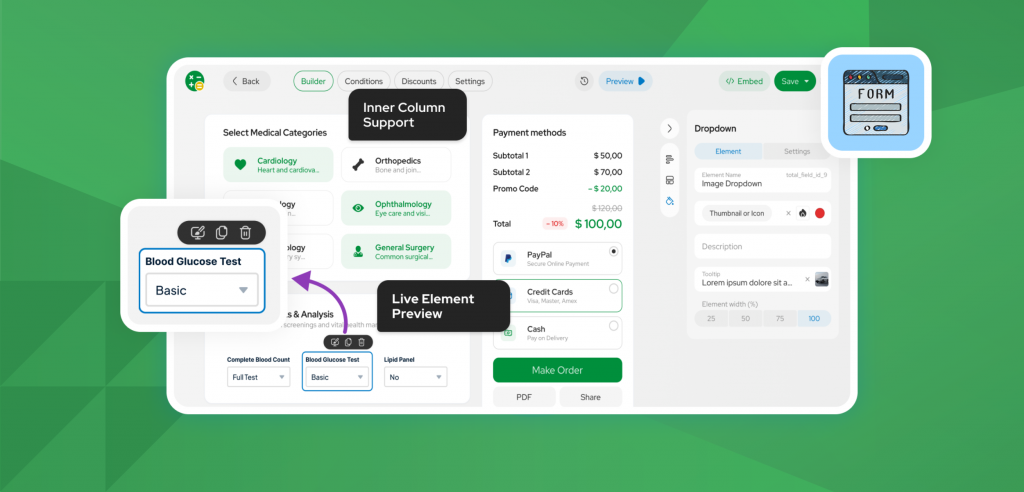
The old routine: build here, preview there, style somewhere else – is gone. What you see in the builder is what you get on the page. Layout, styling, spacing, the real thing. Live.
Total Summary, Order Form, Appearance, Confirmation Page. All of it now lives inside the builder. One place, one flow, no more jumping between tabs trying to remember what you changed.
Total Summary, finally yours
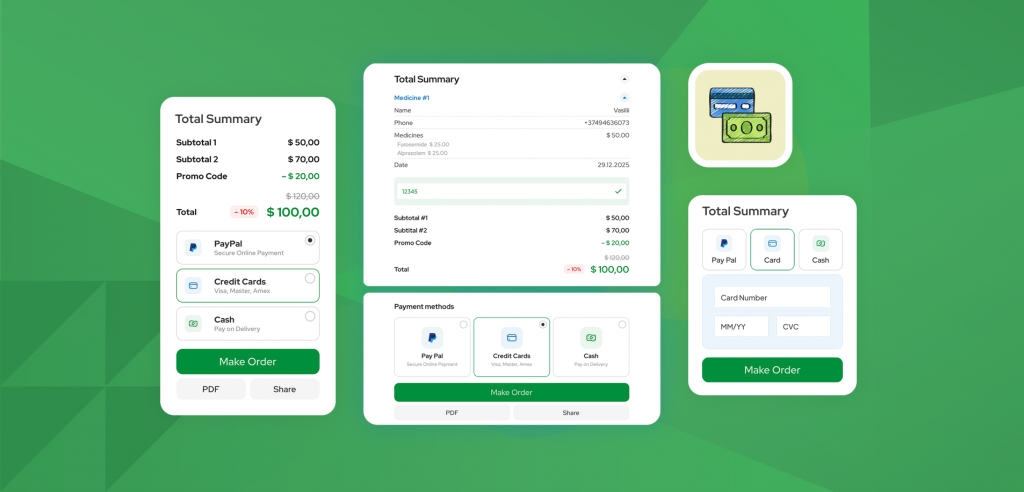
The rigid Total Summary layout is retired. Break it into sections. Drop elements where they should go. Build a summary that actually fits your calculator, not the one we shipped in 3.x.
Conditions that don’t look like a tangle
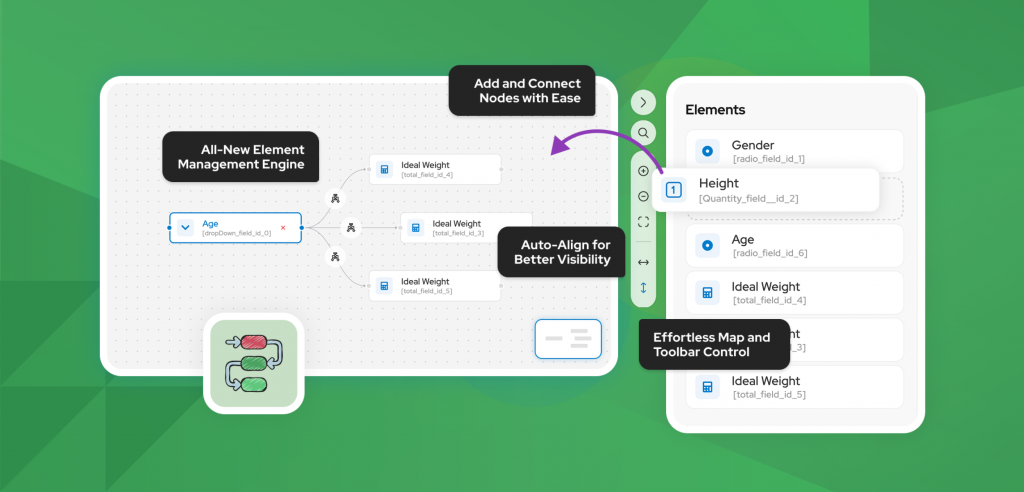
Connecting fields used to be a pain. Now it isn’t. The new conditions engine makes even complex setups fast and readable. The kind you can come back to in three months and still understand.
Lines going everywhere? One click and they auto-align into a clean flow. Too many fields on one canvas? Move groups into their own workspaces. Conditions scale with your calculator now, not against it.
Other Notable Changes
- Refreshed UI. Every screen rebuilt with intention. Things are where you’d expect them – which is where they should’ve been all along.
- Calculator List. List view, grid view, your call.
- Settings, reorganized. Less hunting, more building.
- Dark mode. Full support across the builder. Your eyes will thank you at 2am.
- Performance. Faster admin, faster frontend. The whole thing feels lighter.
How to Download Cost Calculator Builder 4.0 Beta
We recommend installing the beta on a clean WordPress test site, either local or staging. Since this is a beta release, avoid using it on production websites.
You can download both Free and Pro beta versions here:
Installations steps:
- Download both Free and Pro archives.
- Go to your WordPress admin panel.
- Navigate to Plugins → Add New → Upload Plugin and select the downloaded ZIP file and install (no need to unzip)
- Activate the Free & Pro versions.
sk_I@=Ag9+zhq!nm@=2ewQ2%2FP-u&Lp
Found something? Tell us.
If it breaks, glitches, looks off, or just feels wrong. We want to know. Click below and drop it into the Cost Calculator 4.0 Feedback form. The more detail, the better.
Important: This is a beta version. Do NOT install it on your live site. It may contain bugs, incomplete features, or breaking changes. Use a fresh test environment only: a staging site or a local WordPress setup. Services like InstaWP or TasteWP let you spin up a free test site in seconds.Your feedback is what makes the 4.0 release solid. Test it, break it, tell us everything.